Spatial Audio on Headphones: Hear True 3D Sound
Hear in 3D with Spatial Audio on Headphones: The Ultimate Guide to Immersive Sound Experience
Spatial audio can make music, movies, and games feel more lifelike by placing sounds around the listener instead of just left and right. Instead of a flat “wall” of sound inside your head, a good spatial mix can create the impression of distance, height, and movement—like a scene unfolding in front of you. This guide explains what’s actually happening, what you need on a phone or computer, and which settings tend to make the biggest real-world difference on regular headphones.
What “3D sound” means on headphones
Traditional stereo audio uses two channels to create left/right placement. Spatial audio aims to add front/back/above/below cues using psychoacoustics—how the brain interprets tiny changes in timing, loudness, and tone as direction and space.
- Stereo vs 3D: Stereo is primarily left/right panning; spatial audio tries to create a 3D sound field with convincing depth and direction.
- Two common approaches: (1) Object-based mixes (often used in cinema) rendered for headphones, and (2) stereo that’s processed with virtual surround/HRTF to simulate speakers around you.
- Why it can feel real: Your brain uses interaural time differences (ITD), interaural level differences (ILD), and frequency shaping (caused by your head and outer ears) to judge direction.
- Limits to expect: Ear shape, headphone positioning, seal/fit, and the quality of the mix can make the “out of head” effect stronger or weaker.
How spatial audio works: HRTF, binaural rendering, and head tracking
Most “spatial audio on headphones” boils down to binaural audio: a two-channel signal designed to trigger 3D perception when played through headphones.
- HRTF (Head-Related Transfer Function): A model of how sound from different directions is filtered by your torso, head, and outer ears before reaching the eardrum. This filtering is one of the main reasons “above” and “behind” can be perceived in headphones.
- Binaural rendering: Multi-channel or object-based audio is converted into two channels using an HRTF-based renderer so headphones can simulate a surround layout.
- Head tracking: When supported, sensors track head movement so the sound stage stays “anchored” to the screen. Turn your head left, and the dialogue still feels like it’s coming from the TV instead of rotating with you—an important realism boost for movies and VR.
- Not all spatial is equal: Some modes are basically gentle stereo widening; others are full 360° virtualization with more precise placement and distance cues.
Formats and ecosystems: where spatial audio comes from
Spatial audio isn’t one single format. What you hear depends on the content (how it was mixed), the app (how it delivers that content), and the device (how it renders it for your headphones).
- Movies/TV: Often use object-based formats that can be rendered binaurally for headphones. Platform support varies by streaming service and device.
- Music: May be mixed specifically for immersive playback—or upmixed from stereo. Purpose-built immersive masters tend to sound more stable and intentional than generic upmixing.
- Games: Frequently output multi-channel audio that a console or PC can virtualize for headphones, producing clear positional cues for footsteps, reloads, and environmental reflections.
- Compatibility: It’s common for a device setting to say “spatial,” but the app may still be playing plain stereo, or the title you chose may not actually have an immersive mix.
Common spatial audio options and what they’re best for
| Option | Typical source | Best for | Notes |
|---|---|---|---|
| Dolby Atmos (binaural/spatial) | Streaming apps, phones, TVs, some PCs | Movies and Atmos music | Experience varies by app and device settings |
| DTS Headphone:X / DTS:X | Some PCs and AV ecosystems | Games and movies | Often presented as a virtual surround mode |
| Windows Sonic / platform virtual surround | PC and console audio settings | Gaming and general use | Easy to enable; can sound processed on some headphones |
| App-based spatial/360 modes | Specific music or headphone apps | Music immersion | Quality depends heavily on the mix and tuning |
For deeper platform details, see Dolby’s Atmos overview, Apple’s Spatial Audio and head tracking support notes, and Microsoft’s guide to Spatial sound in Windows.
What you need for a great experience (and what matters most)
Marketing can make it sound like you need special “surround headphones,” but the essentials are simpler: decent headphones, compatible playback, and the right content.
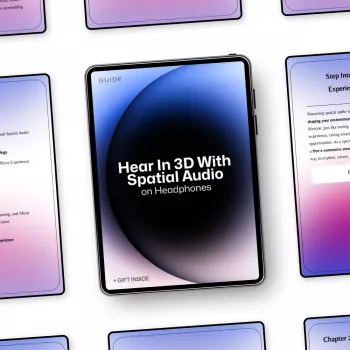
If you want a structured walkthrough you can revisit while testing different apps and settings, you can keep this guide handy: Hear in 3D with Spatial Audio on Headphones: The Ultimate Guide to Immersive Sound Experience.
Setup checklist: quick steps that usually fix “it doesn’t sound 3D”
Tuning tips for more convincing immersion
A practical learning path: from first demo to everyday listening
Helpful audio picks to support your setup
- Hear in 3D with Spatial Audio on Headphones: The Ultimate Guide to Immersive Sound Experience (digital guide)
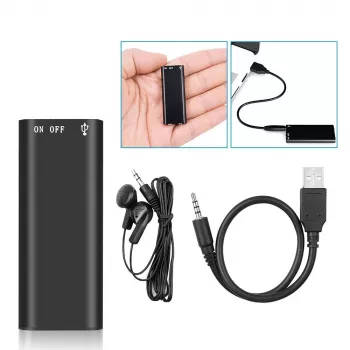
- Mini 8GB Voice Recorder Digital Audio MP3 Player USB Pen with Earphones (handy for quick A/B recordings or capturing room tone when testing isolation)
FAQ
Does spatial audio work with any headphones?
Usually yes for software-based spatial or binaural modes, but results depend on headphone tuning, fit/seal, and whether the content is truly immersive. Head tracking, when available, may require specific compatible hardware.
Why does spatial audio sometimes sound echoey or distant?
This is often caused by aggressive virtual room processing, stacked effects (like EQ plus an enhancer plus surround), or a binaural profile that doesn’t match your ears well. Switching modes, reducing reverb-like settings, or disabling extra processing typically helps.
Is spatial audio better for movies, music, or gaming?
Movies and games often benefit the most because their mixes are designed around positional cues and movement. Music can be stunning with a great immersive master, but some tracks may sound less natural depending on how they were mixed or upmixed.





Leave a comment