12 Simple Instagram Reels Ideas for Service Businesses

Why Simple Reels Work for Service Businesses
Service businesses don’t need complicated concepts to create Reels that build trust and generate inquiries. The fastest path to consistent posting is a repeatable set of formats—paired with a quick planning checklist—so each Reel clearly shows expertise, highlights results, and makes the next step obvious.
What Makes a Service-Business Reel Work
- Lead with a clear outcome: say what problem gets solved or what result is achieved within the first two seconds.
- Show proof and process: quick behind-the-scenes beats usually outperform vague “motivational” content for local and service providers.
- Keep it skimmable: use strong on-screen text, simple shots, and one message per Reel.
- Use a clear next step: try “Save this,” “DM the word…,” “Book a consult,” or “Comment for the template.”
If you want a plug-and-play set of prompts to avoid overthinking, the 12 Instagram Reels Ideas for Service Businesses | Easy Content Checklist for Consistent Reels, Grow Engagement & Attract Clients is designed to keep ideas moving week after week.
12 Reels Ideas That Are Easy to Repeat (No Fancy Filming Needed)
- Before/After (or Before/During/After): show a transformation, progress photos, screen recordings, or a quick timeline of improvements.
- “3 Signs You Need…”: list symptoms your ideal client already recognizes (pain points, red flags, missed opportunities).
- Quick Audit: review a public example (website, profile, routine, setup) and share three fixes—educational, not harsh.
- Myth vs Truth: address misconceptions that block buyers from taking action.
- Your Process in 15 Seconds: share 3–5 steps with quick visuals so prospects understand what working together looks like.
- Tools You Use: highlight tools/apps/products you rely on and what each one helps you deliver (instant credibility).
- FAQ in One Minute: answer the question you hear every week; add captions and one short CTA.
- Case Study Snapshot: problem → approach → result (blur details if needed and keep it concise).
- “Do This, Not That”: compare a common mistake with a better alternative; keep it specific and actionable.
- Client Journey: walk through what happens from first inquiry to delivery to reduce uncertainty and increase bookings.
- Behind the Scenes: share a real moment—prep, setup, organizing, planning, or a time-lapse of your workflow.
- Personal Values/Boundaries: what you do and don’t do, what you prioritize, and how you communicate to attract better-fit clients.
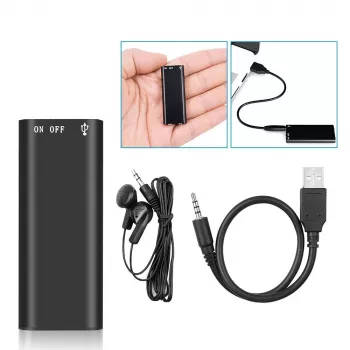
To speed up voiceovers (especially when you’re filming quick B-roll), a small tool can help: Mini 8GB Voice Recorder Digital Audio MP3 Player USB Pen with Earphones makes it easy to capture clean takes and reuse them across multiple Reels.
A Simple Content Checklist for Consistent Reels
- Pick 2 repeatable buckets: Education (tips/FAQs) + Proof (before/after, case study, testimonials).
- Batch 4–8 hooks at once: short, outcome-driven lines that match a bucket (keep a running list in notes).
- Film in one session: capture 10–20 short clips (5–10 seconds each) you can reuse across multiple Reels.
- Write on-screen text first: if the message reads clearly without sound, it’s more likely to hold attention.
- Add one CTA: choose only one (save, share, comment, DM, book) and align it with the Reel’s purpose.
- Schedule a simple cadence: start with 2 Reels/week for 4 weeks, then scale only if it stays sustainable.
- Track 3 signals: saves, shares, and profile actions (follows, website taps, DMs) to learn what drives client intent.
Quick Reels Planner (Copy This Weekly)
| Reel type | Hook | What to show | On-screen points | CTA |
|---|---|---|---|---|
| Before/After | “Watch this transform in 20 seconds” | Before clip → process clip → after clip | 1) Problem 2) What changed 3) Result | “Save for ideas” |
| FAQ | “Do you need ___ before booking?” | Talking head or B-roll + text | Answer in 3 bullet points | “DM ‘INFO’ for next steps” |
| Process | “Here’s what happens after you inquire” | Step-by-step visuals | Step 1–4 with timestamps | “Book a consult” |
| Myth vs Truth | “Stop believing this about ___” | Text-driven with simple shots | Myth → truth → what to do instead | “Share with a friend” |
Make Each Reel Faster: Hooks, Structure, and Simple Filming Tips
- Hook formulas to rotate: “3 signs…”, “Stop doing…”, “If you’re ___, do this…”, “The #1 reason ___ doesn’t work…”, “What I’d do if I started over…”.
- Keep a repeatable structure: Hook (0–2s) → 2–4 teaching beats → proof/example → CTA.
- Use B-roll to avoid constant talking head: hands working, screen recordings, client-ready deliverables, setup shots, tools.
- Keep captions readable: high contrast, fewer words per line, and enough time to read.
- Audio is optional, clarity is not: prioritize clear voice and captions over trending sounds when trends don’t fit your brand.
For up-to-date platform guidance, review the Instagram Help Center — Reels and the Meta Business Help Center — Instagram Reels. For practical execution tips, the Hootsuite Blog — Instagram Reels tips is also a helpful reference.
Turn Engagement Into Client Inquiries (Without Being Pushy)
A Ready-Made Checklist to Keep Ideas Flowing
If you want a lightweight resource you can reference every week, keep this handy: 12 Instagram Reels Ideas for Service Businesses | Easy Content Checklist for Consistent Reels, Grow Engagement & Attract Clients.
FAQ
How many Reels should a service business post each week?
Start with a sustainable baseline (often 2 per week) and stay consistent for 4 weeks before increasing. Pay more attention to saves, shares, and profile actions than raw view counts.
What should a service business post if there’s no time to film?
Use text-led Reels with simple B-roll, screen recordings, repurposed content, and quick answers to client questions with a short voiceover. A repeatable template with a hook and 2–4 bullet points keeps creation fast.
Do Reels need trending audio to perform well?
No—clear messaging, strong hooks, and helpful content can perform without trends. Trending audio can help discoverability when it fits, but clarity, captions, and a focused takeaway matter more for converting viewers into inquiries.





Leave a comment